File Uploads Are Easy—Until They Reach Production: Introducing filestore for FastAPI
A practical guide to validated uploads, local and multi-cloud storage, direct-to-cloud transfers, dynamic file pipelines, and reliable upload APIs with Python.
Adding a file input to a form takes a minute. Building a file-upload system that you can trust in production does not.
The first version often looks like this: receive an UploadFile, read its contents, and write the bytes somewhere. Then reality arrives.
- Two users upload a file called
report.pdf. - A client submits five valid files and one invalid file.
- A browser sends an empty file input as though it were a multipart part.
- A large upload exhausts memory or fills a server disk.
- Someone uploads an
.exerenamed to.png. - Files need to move from local development to S3 in production.
- One form needs to put an avatar on disk and a résumé in cloud storage.
- Private documents need short-lived download links.
- A mobile client should upload a 2 GB video without routing the bytes through the API.
- The application needs a stable result model it can store, log, retry, and return.
These are not edge cases. They are the normal lifecycle of an upload feature.
filestore is an open-source, typed file-upload dependency and storage toolkit for FastAPI. It keeps the three-line version three lines long, but has an answer for every one of those questions. It provides one small API for parsing multipart uploads, validating them, transforming their names and destinations, persisting them to different backends, and describing the result. It includes local-disk and in-memory engines, with optional engines for Amazon S3 and S3-compatible services, Google Cloud Storage, and Azure Blob Storage.
This guide starts with a single endpoint and builds toward multi-field, multi-cloud, direct-to-storage systems. Along the way, it explains not only what the library can do, but when each feature is useful and where your application still needs to make policy decisions.
This article covers filestore 2.0, which requires Python 3.11 or newer and FastAPI 0.120 or newer.
Follow along
Most sections below correspond to a live page in the example app — an
interactive gallery that demonstrates every feature, with the server code
shown next to each form. Run it with uv sync --group dev && uvicorn
example.main:app --reload, then open http://127.0.0.1:8000.
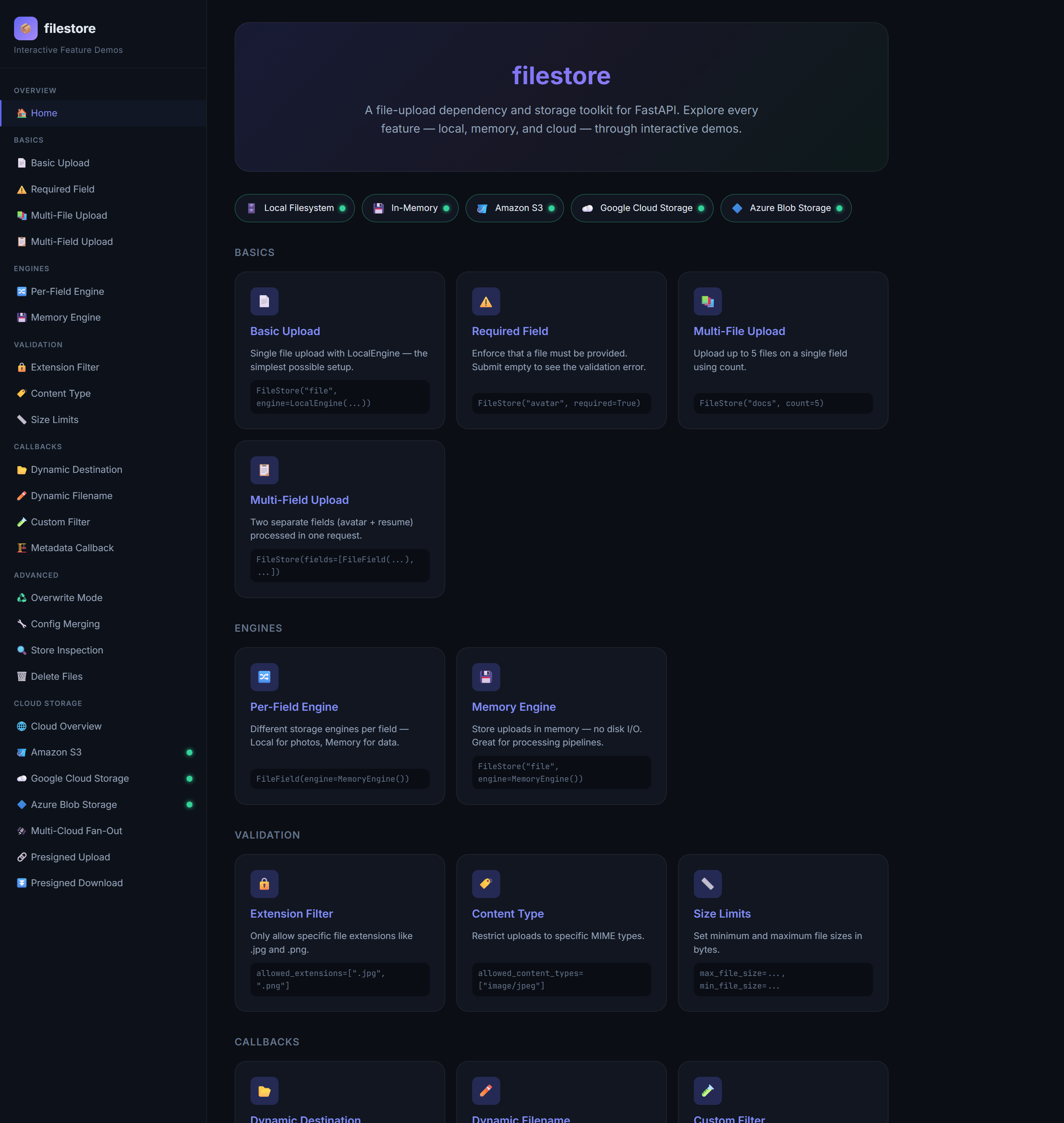
The sidebar of that app is effectively a table of contents for this article: Basics, Engines, Validation, Callbacks, Advanced, and Cloud Storage. The pills under the hero — with their little green dots — are the five storage backends, showing which ones are configured in the current environment.
The mental model
filestore has exactly three moving parts. Once they click, the whole library fits in your head.
graph LR
    A["HTTP multipart<br/>request"] --> B["FileStore<br/>(FastAPI dependency)"]
    B -->|"validates, runs callbacks"| C["StorageEngine<br/>(local / memory / S3 / GCS / Azure)"]
    C -->|"persists bytes"| D["Store<br/>(Pydantic result)"]
D --> E["your route<br/>returns it"]FileStoreis the orchestrator. It is a callable FastAPI dependency that knows which form fields to read, how many files to accept, and which policies to apply. It parses the multipart body, validates every file, runs your callbacks, and hands each file to an engine.- A
StorageEnginepersists the bytes.LocalEngineandMemoryEngineship in the box;S3Engine,GCSEngine, andAzureBlobEnginecome with optional extras. They all implement the same interface, so swapping backends is a one-line change. You can also target a backend that you implement yourself. Storeis the result. It is a Pydantic model containing the outcome of the request and aFileDatarecord for every accepted or rejected file. Because it is a Pydantic model, you can return it straight from your route and FastAPI serializes it for you.
That separation is the key design choice. Your route describes business behavior. The FileStore describes upload policy. The engine describes infrastructure. You can change one without rewriting the others.
Here is the whole happy path in one route:
from fastapi import Depends, FastAPI
from filestore import FileStore, LocalEngine, Store

app = FastAPI()
storage = FileStore("file", engine=LocalEngine(base_dir="uploads", base_url="/media"))


@app.post("/upload")
async def upload(store: Store = Depends(storage)) -> Store:
    return store
Installation
The base package contains everything required for local and in-memory uploads:
Cloud SDKs are optional, so an application only installs what it uses:
pip install "filestore[s3]"      # Amazon S3, MinIO, LocalStack, R2, and other S3-compatible stores
pip install "filestore[gcp]"     # Google Cloud Storage
pip install "filestore[azure]"   # Azure Blob Storage
pip install "filestore[all]"     # all cloud engines
This keeps local-only applications lean. import filestore never imports boto3, google-cloud-storage, or the Azure SDK; they load only when you actually touch a cloud engine, and a missing extra produces a clear MissingDependencyError rather than an ImportError at startup. Cloud clients are also created lazily and cached on their engine instances rather than being rebuilt for every request.
Basics: your first upload endpoint
Create an engine, create a store, and inject the store into a route:
from fastapi import Depends, FastAPI
from filestore import FileStore, LocalEngine, Store

app = FastAPI()

local = LocalEngine(
    base_dir="uploads",
    base_url="/media",
)

documents = FileStore(
    "document",
    required=True,
    engine=local,
)


@app.post("/documents")
async def upload_document(store: Store = Depends(documents)) -> Store:
    return store
FileStore("document") means "read the multipart field named document." required=True means an omitted or empty field is a failure. LocalEngine writes the accepted file beneath uploads and builds a public URL beginning with /media.
That is the Basic Upload demo. Open its page in the example app and you get a dropzone, an upload button, and — once you submit — a result panel. Every demo page follows this pattern: a live "Try It" card on the left, the exact server code on the right.
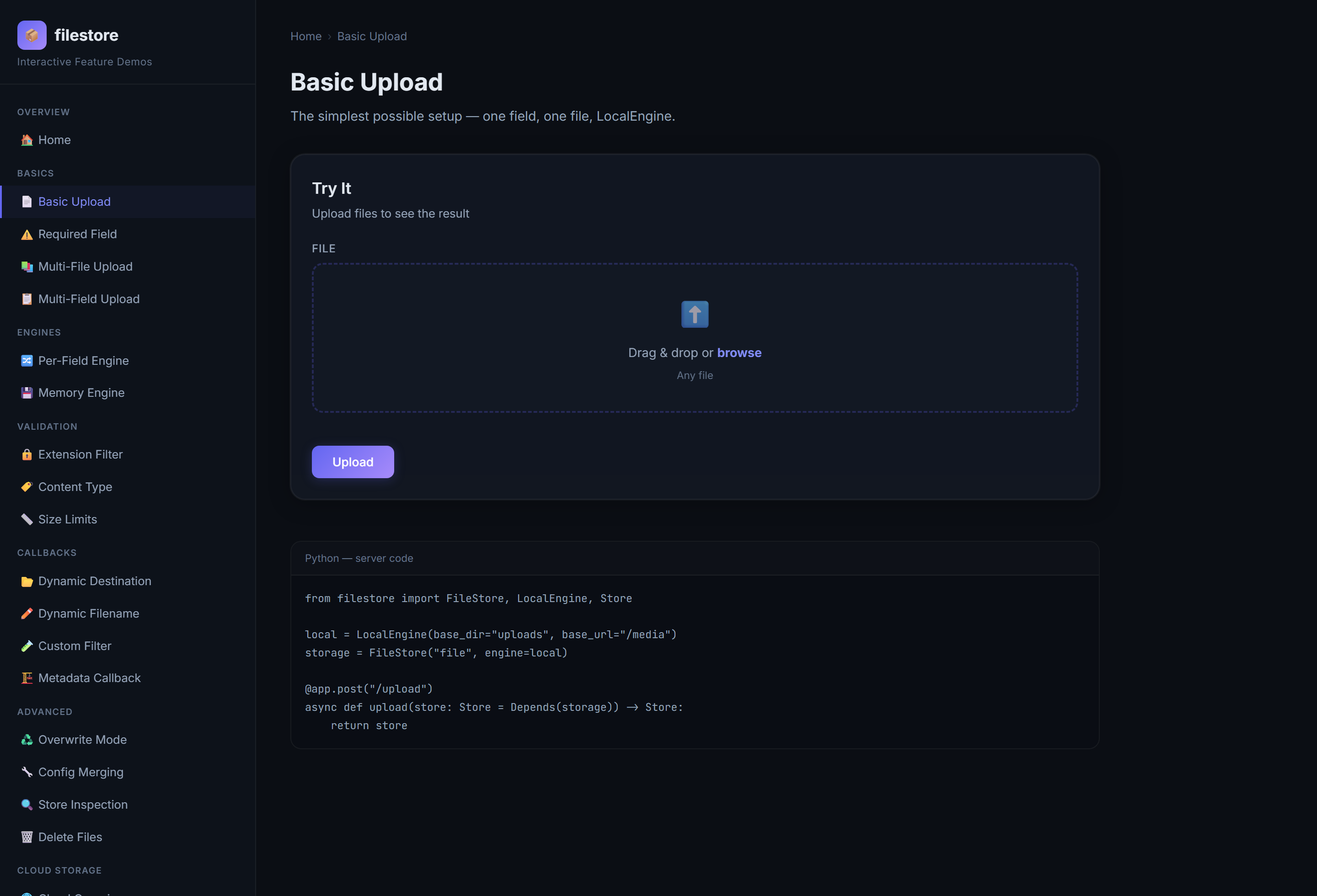
Drop a file in and hit Upload:
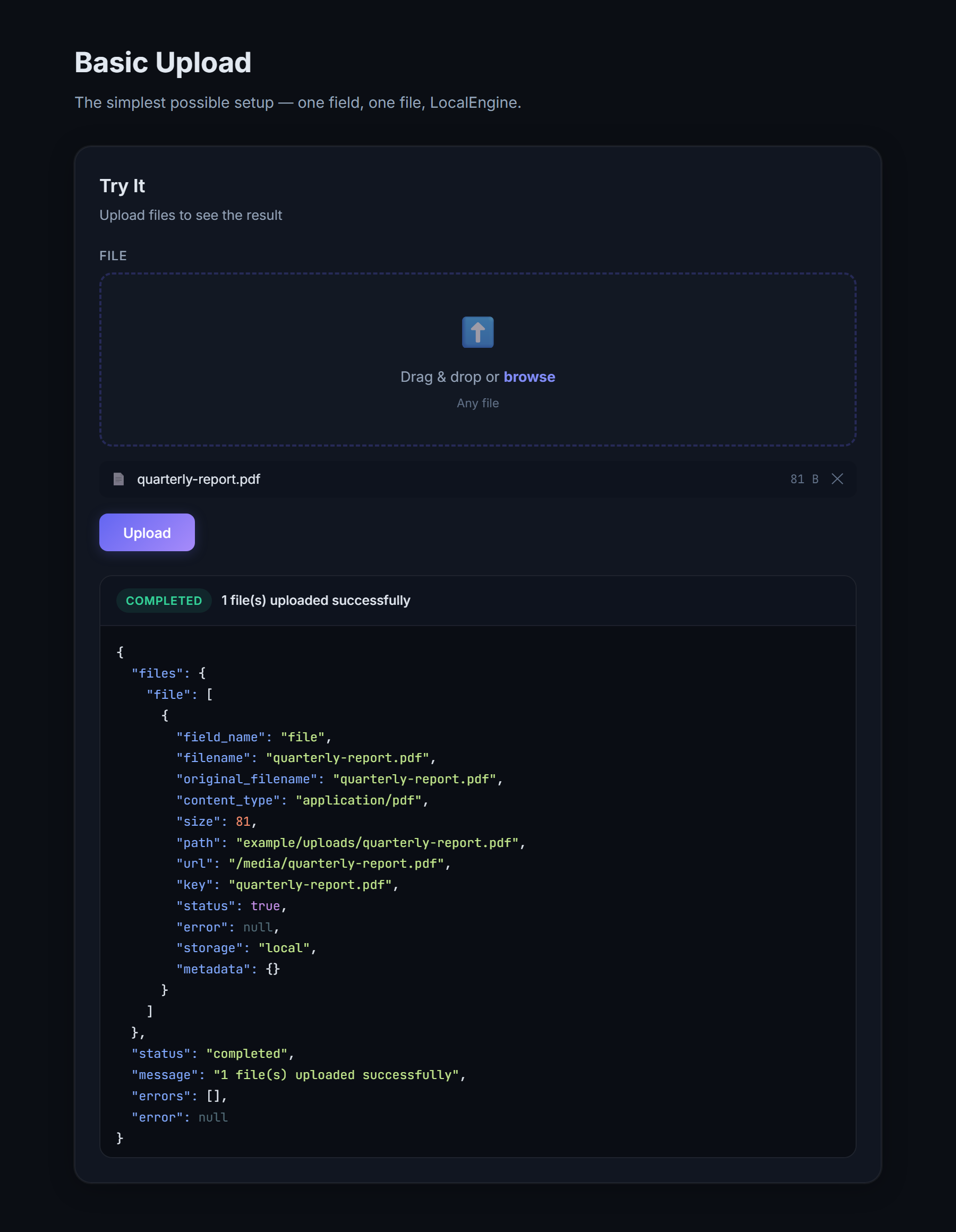
That green completed badge and the JSON beneath it are the Store model, serialized. This is worth dwelling on, because the result shape is where a lot of upload libraries fall short.
Because Store is a Pydantic model, FastAPI can serialize it directly. A successful response has a shape similar to this:
{
  "files": {
    "document": [
      {
        "field_name": "document",
        "filename": "quarterly-report.pdf",
        "original_filename": "Quarterly Report.pdf",
        "content_type": "application/pdf",
        "size": 284991,
        "path": "C:/app/uploads/quarterly-report.pdf",
        "url": "/media/quarterly-report.pdf",
        "key": "quarterly-report.pdf",
        "status": true,
        "error": null,
        "storage": "local",
        "metadata": {}
      }
    ]
  },
  "status": "completed",
  "message": "1 file(s) uploaded successfully",
  "errors": [],
  "error": null
}
To serve the directory during development, mount it with Starlette's static-file support:
from fastapi.staticfiles import StaticFiles

app.mount("/media", StaticFiles(directory="uploads"), name="media")
For substantial production traffic, a reverse proxy, CDN, or object store is usually a better file-serving layer than the application process.
Understanding upload results
A reliable upload API needs more than "success" or "exception." filestore models outcomes at two levels.
One FileData per file
Every file produces a FileData object with these fields:
| Attribute | Meaning |
|---|---|
field_name |
Multipart field that supplied the file |
filename |
Final stored name after callbacks and sanitization |
original_filename |
Name sent by the client |
content_type |
MIME type reported by the client |
size |
Stored size in bytes |
path |
Absolute path for local files |
url |
Public or provider URL when one can be derived |
key |
Stable relative path or cloud object key |
status |
Whether this individual file succeeded |
error |
Human-readable failure reason |
storage |
Engine name, such as local, memory, s3, gcs, or azure |
metadata |
Application and backend metadata |
file |
Raw bytes from MemoryEngine; excluded from JSON serialization |
file_data.location returns the most useful available locator in this order: URL, path, then key. bool(file_data) is the same as file_data.status.
The key deserves special attention. It is the value to save in your database when you later need to delete an object or generate a private download URL. A public URL can change when domains or CDN settings change; the storage key is the durable identity within the backend.
Raw bytes (file, memory engine only) are automatically excluded from JSON — so returning a Store never accidentally dumps a megabyte of binary into your response.
One Store per request
The aggregate Store groups results by field and exposes convenient views:
store.files                 # dict[str, list[FileData]]
store.flat_files            # every result in one list
store.successful_files      # successful results only
store.failed_files          # rejected or failed results only
store.total_files           # successes + failures
store.total_size            # bytes across successful files
store.first("document")     # first result for a field, or None
store.errors                # every distinct error
store.error                 # first error, or None
store.message               # aggregate summary
One request, four outcomes
Store.status is not a boolean; it is an UploadStatus string enum with four values, so a client can branch on the aggregate outcome without parsing prose:
graph TD
    S["finalize()"] --> A{"any files?"}
    A -->|no| E{"errors?"}
    E -->|no| EMPTY["empty"]
    E -->|yes| FAIL1["failed"]
    A -->|yes| B{"all succeeded?"}
    B -->|yes| DONE["completed"]
    B -->|some| PARTIAL["partial"]
B -->|none| FAIL2["failed"]| Status | Meaning |
|---|---|
completed |
Every submitted file succeeded |
partial |
At least one file succeeded and at least one failed |
failed |
Nothing succeeded, or request parsing failed |
empty |
No files were supplied and no required-field error occurred |
bool(store) is True only when the status is completed, so the ergonomic if store: still works — but partial is a first-class, machine-readable state, which is exactly what you want when four of five files uploaded and you need to tell the client which one to retry. An explicit status check is clearer whenever partial success matters:
from fastapi import HTTPException
from filestore import UploadStatus


@app.post("/documents")
async def upload_document(store: Store = Depends(documents)):
    if store.status is UploadStatus.FAILED:
        raise HTTPException(status_code=422, detail=store.model_dump(mode="json"))

    if store.status is UploadStatus.PARTIAL:
        return {
            "message": "Some documents need to be retried",
            "uploaded": [f.model_dump(mode="json") for f in store.successful_files],
            "failed": [f.model_dump(mode="json") for f in store.failed_files],
        }

    return store
By default, upload-time validation and persistence errors are returned inside the Store; they do not escape from the dependency. Your route remains responsible for choosing the HTTP status and business response that fit your API contract.
Required fields and the empty-input trap
The Required Field demo marks a field required=True. Submit the form with no file and you get a clean failure instead of a silent success:
There is a subtle correctness win here. Browsers submit an empty file input as a part with filename="" and an empty body. Many frameworks treat that as a real zero-byte upload; filestore recognizes it as "no file provided", so a required field correctly rejects it rather than storing an empty upload file.
Multiple files on one field
Multi-File Upload uses the count shorthand:
Send six files and the sixth comes back as a failed FileData (Field 'docs' accepts at most 5 file(s)) while the first five succeed — a partial result.
Validation: gatekeeping before you persist
filestore validates every file before handing it to an engine. Failures are captured per-file in the Store; they never raise out of your endpoint. The example app has a demo for each built-in check:
- Extension Filter —
allowed_extensions=[".jpg", ".png", ...]. Case-insensitive, leading dot optional. - Content Type —
allowed_content_types=["image/jpeg", "image/png"], matched against the client's MIME type. - Size Limits —
max_file_sizeandmin_file_sizein bytes. The local engine enforces the maximum mid-stream, aborting a runaway upload before it fills your disk rather than after.
The most common rules are declarative:
from filestore import FileStore, LocalEngine, StoreConfig

images = FileStore(
    "image",
    count=4,
    required=True,
    engine=LocalEngine(base_dir="uploads"),
    config=StoreConfig(
        allowed_extensions={".jpg", ".jpeg", ".png", ".webp"},
        allowed_content_types={
            "image/jpeg",
            "image/png",
            "image/webp",
        },
        min_file_size=1,
        max_file_size=5 * 1024 * 1024,
    ),
)
Configuration is a StoreConfig (a validated Pydantic model), but plain dictionaries work anywhere a StoreConfig is accepted, so this is equally valid:
Extensions are normalized to lowercase with a leading dot. Content types are matched case-insensitively. Invalid configuration—such as a minimum size larger than the maximum—is rejected at application startup rather than during a user request. Everything is merged once when the store is constructed, not on every request.
File-size checks happen in layers. A client-provided size hint can reject an upload early, but engines validate the actual stream size as well. LocalEngine checks the growing byte count while writing chunks, so it can abort an oversized stream before completing the file.
There is an important security boundary here: a filename extension and a Content-Type header are client-supplied metadata. They are useful policy signals, but they do not prove what is inside a file. For sensitive formats, add a callback that examines magic bytes or parses the content with a hardened format-specific library. Malware scanning and content moderation also belong in your application's ingestion pipeline.
Custom validation with filters
When an allowlist is not enough, use a filter callback. A filter receives an UploadContext and can be synchronous or asynchronous. Return True to accept the file, False to reject it with a generic message, or a string to reject it with that message.
async def reject_large_images(ctx):
    if not (ctx.file.content_type or "").startswith("image/"):
        return "Only image files are accepted"
    if (ctx.file.size or 0) > 200 * 1024:
        return "Image too large — max 200 KB"
    return True
Filters can also inspect the bytes themselves, which is how you enforce a real format rather than a claimed one:
from filestore import FileStore, MemoryEngine, UploadContext


async def require_pdf_signature(ctx: UploadContext) -> bool | str:
    # Preserve the position because the engine will read the stream later.
    await ctx.file.seek(0)
    signature = await ctx.file.read(5)
    await ctx.file.seek(0)

    if signature != b"%PDF-":
        return "The uploaded file is not a valid PDF document"
    return True


pdfs = FileStore(
    "document",
    engine=MemoryEngine(),
    config={
        "allowed_extensions": [".pdf"],
        "allowed_content_types": ["application/pdf"],
        "filters": [require_pdf_signature],
    },
)
Filters are ideal for format inspection, user quotas, antivirus services, image-dimension rules, document parsers, or business checks based on other form fields. Multiple filters run in order and stop at the first rejection.
Callbacks: computing behavior at request time
Upload behavior is rarely completely static. Filters are one of four callback hooks—filename, destination, metadata, and filters—and every one receives the same UploadContext:
ctx.request       # Starlette Request
ctx.form          # parsed FormData, including non-file fields
ctx.field_name    # current configured file field
ctx.file          # current UploadFile
Because callbacks may be sync or async, they can perform simple string manipulation or consult a database or authorization service. The example app has a demo for each.
Generate private, collision-resistant names
from pathlib import PurePosixPath
from uuid import uuid4


def secure_filename(ctx):
    suffix = PurePosixPath(ctx.file.filename or "").suffix.lower()
    return f"{uuid4().hex}{suffix}"


avatars = FileStore(
    "avatar",
    config={"filename": secure_filename},
)
Server-generated names avoid leaking a user's local filename, make guessing harder, and prevent common collisions. The original name remains available as original_filename.
A filename callback can return a string, a Path, or a replacement UploadFile. Returning another UploadFile supports advanced transformations that need to replace the stream as well as the name.
Whatever a filename callback returns is still sanitized — traversal segments like ../ are stripped and unsafe characters replaced — so a hostile client cannot walk out of your upload directory.
Route files into tenant or user prefixes
async def user_destination(ctx):
    user = ctx.request.state.user
    return f"tenants/{user.tenant_id}/users/{user.id}"


documents = FileStore(
    "document",
    config={"destination": user_destination},
)
For local storage, the destination is a directory. For cloud engines, it becomes an object-key prefix. The same callback therefore works when an application moves from disk to S3.
Do not blindly copy a tenant ID from a request header into a destination. Resolve it from an authenticated principal or validate it against an allowlist. Filenames are sanitized, but authorization remains an application concern.
Attach searchable application metadata
def upload_metadata(ctx):
    return {
        "request_id": ctx.request.headers.get("X-Request-ID"),
        "uploader_id": str(ctx.request.state.user.id),
        "category": ctx.form.get("category"),
    }


documents = FileStore(
    "document",
    config={"metadata": upload_metadata},
)
The returned mapping is merged into FileData.metadata. This is useful for persistence, auditing, downstream jobs, and correlating storage operations with request logs. It is result metadata; backend-specific upload parameters belong in extra_args.
Multiple files and multiple fields
The single-field shorthand accepts a maximum count:
If the client sends more than ten files under photos, the excess files become failed FileData records while files within the limit continue. The request can therefore finish as partial.
Real forms are rarely single-field. Multi-Field Upload handles an avatar and a résumé — different constraints, different destinations — in one request:
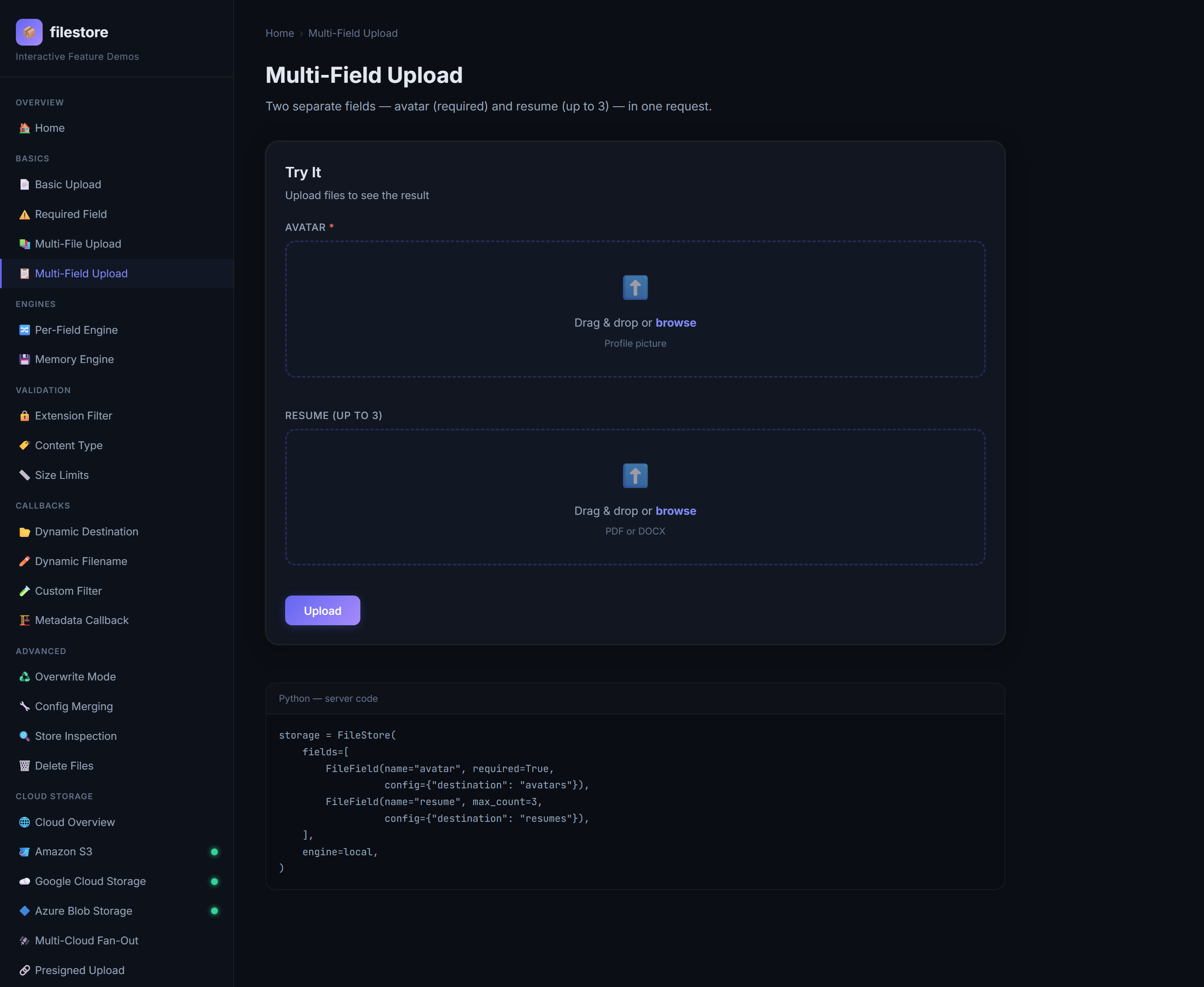
For forms with different file roles, define explicit FileField objects:
from filestore import FileField, FileStore, LocalEngine, StoreConfig

profile_form = FileStore(
    fields=[
        FileField(
            name="avatar",
            required=True,
            max_count=1,
            config={
                "destination": "avatars",
                "allowed_extensions": [".jpg", ".png", ".webp"],
                "max_file_size": 2 * 1024 * 1024,
            },
        ),
        FileField(
            name="resume",
            required=False,
            max_count=1,
            config={
                "destination": "resumes",
                "allowed_extensions": [".pdf"],
                "max_file_size": 10 * 1024 * 1024,
            },
        ),
        FileField(
            name="portfolio",
            max_count=5,
            config={"destination": "portfolio"},
        ),
    ],
    engine=LocalEngine(base_dir="user-content"),
    config=StoreConfig(sanitize_filename=True),
)
Store-level configuration supplies the baseline. A field's explicitly set configuration overrides it key by key. Filters are the exception: store-level and field-level filters are concatenated, with store-level filters running first. The merge is calculated once when the FileStore is constructed.
Fields are processed concurrently with asyncio.gather, and multiple files within a field are processed concurrently too. This is particularly useful when different fields target independent network storage services. It also means callbacks and custom engines must be safe for concurrent use.
And here is the feature that makes filestore compose: a field can use its own engine. The Per-Field Engine demo keeps a photo on disk while holding a data blob in memory:
FileStore(fields=[
    FileField(name="photo", config={"destination": "photos"}),   # → LocalEngine (default)
    FileField(name="data", engine=MemoryEngine()),               # → memory, raw bytes
], engine=local)
That per-field engine hook is the same mechanism the multi-cloud demo uses later to fan one request out across S3, GCS, and Azure at once.
The engine system
Everything so far used the local disk. But LocalEngine is just one implementation of an interface every backend shares:
graph TD
    SE["StorageEngine (ABC)"] --> L["LocalEngine — atomic disk writes"]
    SE --> M["MemoryEngine — bytes in RAM"]
    SE --> S3["S3Engine — boto3, SigV4"]
    SE --> G["GCSEngine — google-cloud-storage, V4"]
    SE --> AZ["AzureBlobEngine — azure-storage-blob, SAS"]
Every engine implements save(). Cloud engines additionally support delete(), presign_upload(), and presign_download():
| Engine | Best suited to | Upload | Delete | Presigned upload/download |
|---|---|---|---|---|
LocalEngine |
Development, single-node services, mounted volumes | Yes | Yes | No |
MemoryEngine |
Inspection and immediate processing | Yes | No | No |
S3Engine |
Amazon S3 and S3-compatible object stores | Yes | Yes | Yes |
GCSEngine |
Google Cloud Storage | Yes | Yes | Yes |
AzureBlobEngine |
Azure Blob Storage | Yes | Yes | Yes |
The Cloud Overview page is a live dashboard of which backends are configured in your environment and what each one supports:
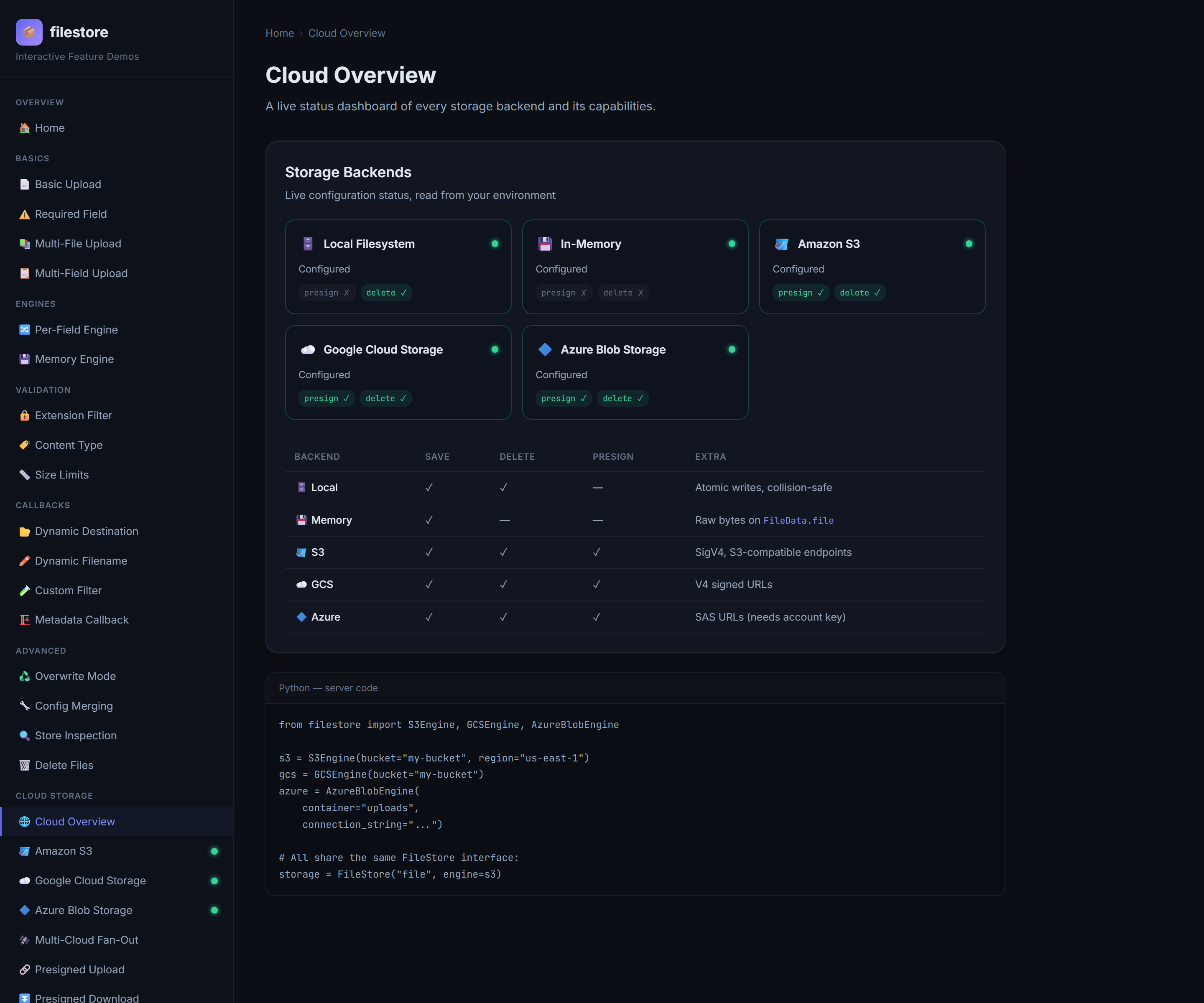
The design principles behind the engine layer are worth calling out, because they show up as real behavior:
- Engines are configured instances, created once. You build
S3Engine(bucket="…", region="…")at startup and reuse it across stores and requests. The SDK client is created lazily and cached on first use — no per-request client construction. - Cloud SDKs are optional and lazy. The base install stays lean, and a missing extra produces a clear
MissingDependencyError, not anImportErrorat startup. - Local writes are atomic.
LocalEnginewrites to a temp file in the target directory and renames it into place, so a reader never sees a half-written file, and a crash mid-upload leaves no partial artifact.
LocalEngine: safe filesystem persistence
local = LocalEngine(base_dir="uploads", base_url="https://cdn.example.com/files")
storage = FileStore("file", engine=local)
Local files are written in configurable chunks to a temporary file in the target directory and then atomically renamed into place. Readers do not see a half-written final file. If overwrite=False, the default, collisions produce names such as report-1.pdf and report-2.pdf instead of destroying an existing object.
Deletion resolves the key beneath base_dir and rejects paths that would escape it.
Local storage is appropriate when files are ephemeral, a persistent volume is mounted, or the deployment is genuinely single-node. Container-local disk is not durable across replacements and is not automatically shared between replicas.
MemoryEngine: build processing pipelines without touching disk
memory = MemoryEngine()
imports = FileStore(
    "csv_file",
    engine=memory,
    config={"max_file_size": 2 * 1024 * 1024},
)


@app.post("/imports/preview")
async def preview_import(store: Store = Depends(imports)):
    item = store.first("csv_file")
    if not item or item.file is None:
        return store

    text = item.file.decode("utf-8")
    return {"lines": text.splitlines()[:10]}
MemoryEngine returns the raw payload in FileData.file. That property is excluded from Pydantic serialization, so returning the Store will not accidentally place binary data in JSON.
Use this engine for image transformations, CSV previews, checksum calculation, content extraction, tests, or forwarding a small payload to another service. Always configure a sensible maximum size: by definition, the whole file will reside in application memory.
Going to the cloud
Switching a store from disk to S3 is a one-line change — the endpoint code does not move:
from filestore import FileStore, S3Engine

storage = FileStore("file", engine=S3Engine(bucket="my-bucket", region="us-east-1"))
GCS and Azure are the same shape. When a backend is not configured, the example app does not crash — the endpoint reports it gracefully. Here is the Azure demo, live because the environment has credentials:
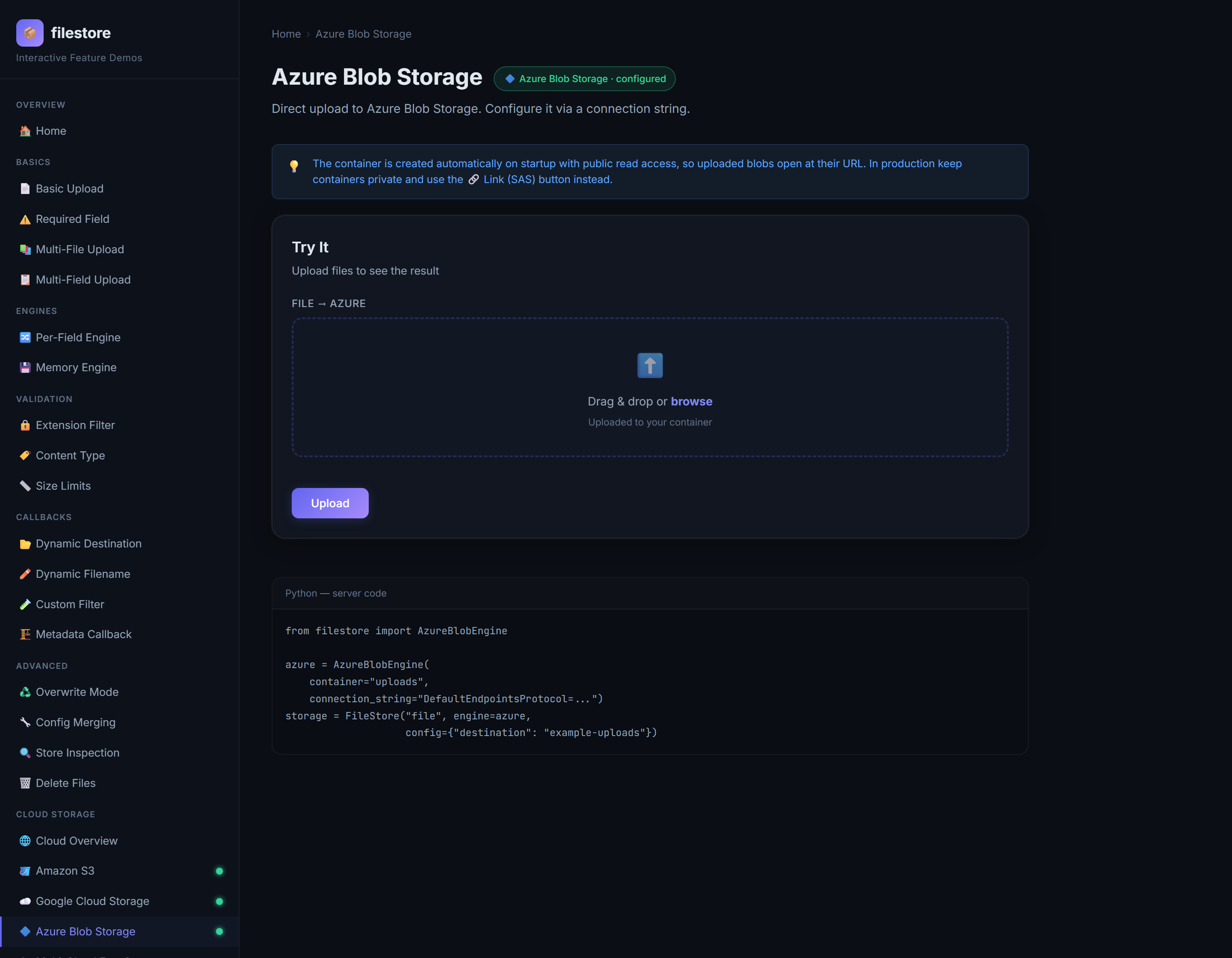
A successful cloud upload returns the same Store/FileData shape as local, with url and key pointing at the object. The result panel adds 🔗 Link and 🗑 Delete buttons — wired to presigned downloads and engine.delete(key) — so you can exercise the object's whole lifecycle from the browser.
S3Engine: AWS and S3-compatible storage
from filestore import S3Engine

s3 = S3Engine(
    bucket="private-documents",
    region="eu-west-1",
)

documents = FileStore("document", engine=s3)
Credentials follow boto3's normal credential chain. bucket and region can also fall back to AWS_BUCKET_NAME and AWS_DEFAULT_REGION.
For S3-compatible services, pass a custom endpoint:
The engine uses Signature Version 4 for presigned URLs and passes the uploaded content type as S3 ContentType. Additional put_object arguments—such as server-side encryption, cache control, or custom metadata—can be supplied through StoreConfig.extra_args.
GCSEngine: Google Cloud Storage
The engine uses Google Application Default Credentials unless explicit credentials or a prebuilt client are provided. Configuration can fall back to GCP_BUCKET_NAME and either GCP_PROJECT or GOOGLE_CLOUD_PROJECT.
When overwrite protection is enabled, the default, GCS uploads use an object-generation precondition so an existing object is not silently replaced. V4 signed URLs require signing credentials with a private key, such as a service account.
AzureBlobEngine: Azure Blob Storage
from filestore import AzureBlobEngine

azure = AzureBlobEngine(
    container="user-content",
    connection_string="...",
)
You can authenticate with a connection string, an account URL plus credential, DefaultAzureCredential, or a prebuilt BlobServiceClient. Environment fallbacks include AZURE_STORAGE_CONTAINER, AZURE_STORAGE_CONNECTION_STRING, and AZURE_STORAGE_ACCOUNT_URL.
Azure presigned operations use Shared Access Signature URLs. SAS generation requires an account key, so token-only identity is sufficient for normal uploads but not for this signing method. Direct browser uploads must send the x-ms-blob-type: BlockBlob header returned by filestore.
Inject prebuilt cloud clients
All cloud engine constructors accept client=. This supports dependency injection, nonstandard credential flows, emulators, centralized SDK configuration, and lightweight fake clients in tests:
s3 = S3Engine(bucket="uploads", client=configured_boto_client)
gcs = GCSEngine(bucket="uploads", client=configured_gcs_client)
azure = AzureBlobEngine(container="uploads", client=blob_service_client)
Put different fields in different backends
Every FileField can override the default engine:
from filestore import FileField, FileStore, MemoryEngine, S3Engine

s3 = S3Engine(bucket="customer-documents", region="eu-west-1")

submission = FileStore(
    fields=[
        FileField(
            name="avatar",
            engine=LocalEngine(base_dir="public-assets"),
            config={"destination": "avatars"},
        ),
        FileField(
            name="contract",
            engine=s3,
            config={"destination": "contracts"},
        ),
        FileField(
            name="import_preview",
            engine=MemoryEngine(),
        ),
    ],
    engine=local,
)
This enables hybrid migrations, storage by data classification, multi-cloud fan-out, and workflows where one part is persisted while another is immediately processed. The route still receives one normalized Store.
Multi-cloud fan-out
Because engines attach per field, one request can write to several backends at once. The Multi-Cloud Fan-Out demo builds a store whose fields each target a different engine — and only shows the providers that are actually configured:
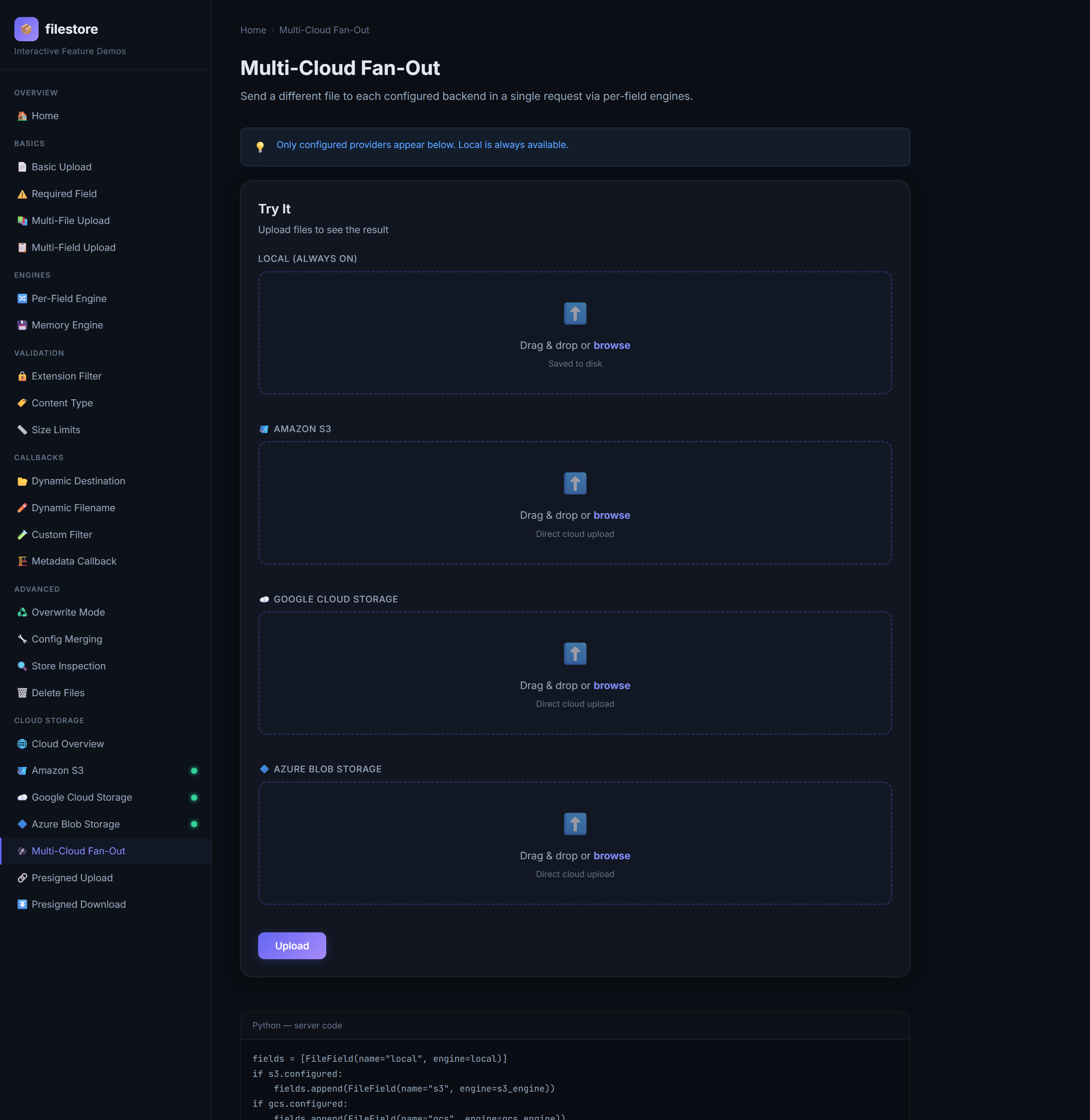
fields = [FileField(name="local", engine=local)]
if s3.configured:    fields.append(FileField(name="s3",    engine=s3_engine))
if gcs.configured:   fields.append(FileField(name="gcs",   engine=gcs_engine))
if azure.configured: fields.append(FileField(name="azure", engine=azure_engine))

storage = FileStore(fields=fields, engine=local)
Submit it and each field persists to its own backend concurrently, returning one Store with a completed status and a FileData per backend. Disk, S3, GCS, and Azure, in a single round trip.
Direct-to-cloud uploads with presigned URLs
Multipart uploads through FileStore send bytes through your FastAPI service. That is convenient because callbacks and validation run in one place. It is not always the right architecture for very large files or high upload volume: the bytes travel to your server, then to the bucket, doubling bandwidth and tying up a worker.
The better pattern for those cases is a presigned URL: your server signs a short-lived URL, and the browser uploads directly to cloud storage.
sequenceDiagram
    participant C as Browser
    participant A as Your API
    participant S as Cloud Storage
    C->>A: POST /presign (filename, content-type)
    A->>A: engine.presign_upload(key)
    A-->>C: { url, method: PUT, headers }
    C->>S: PUT file bytes → signed URL
    S-->>C: 200 OK
    C->>A: POST /finalize (key)
    Note over C,S: The file never touches your API
The transfer has three phases. First, the client asks FastAPI for permission; the API authenticates the caller, chooses an object key, and returns a short-lived URL. Second, the client sends the bytes directly to cloud storage. Finally, the client asks the API to finalize the operation, and the API verifies the stored object before creating the permanent application record.
The Presigned Upload demo does exactly this — pick a provider, choose a file, and the file goes straight to the bucket:
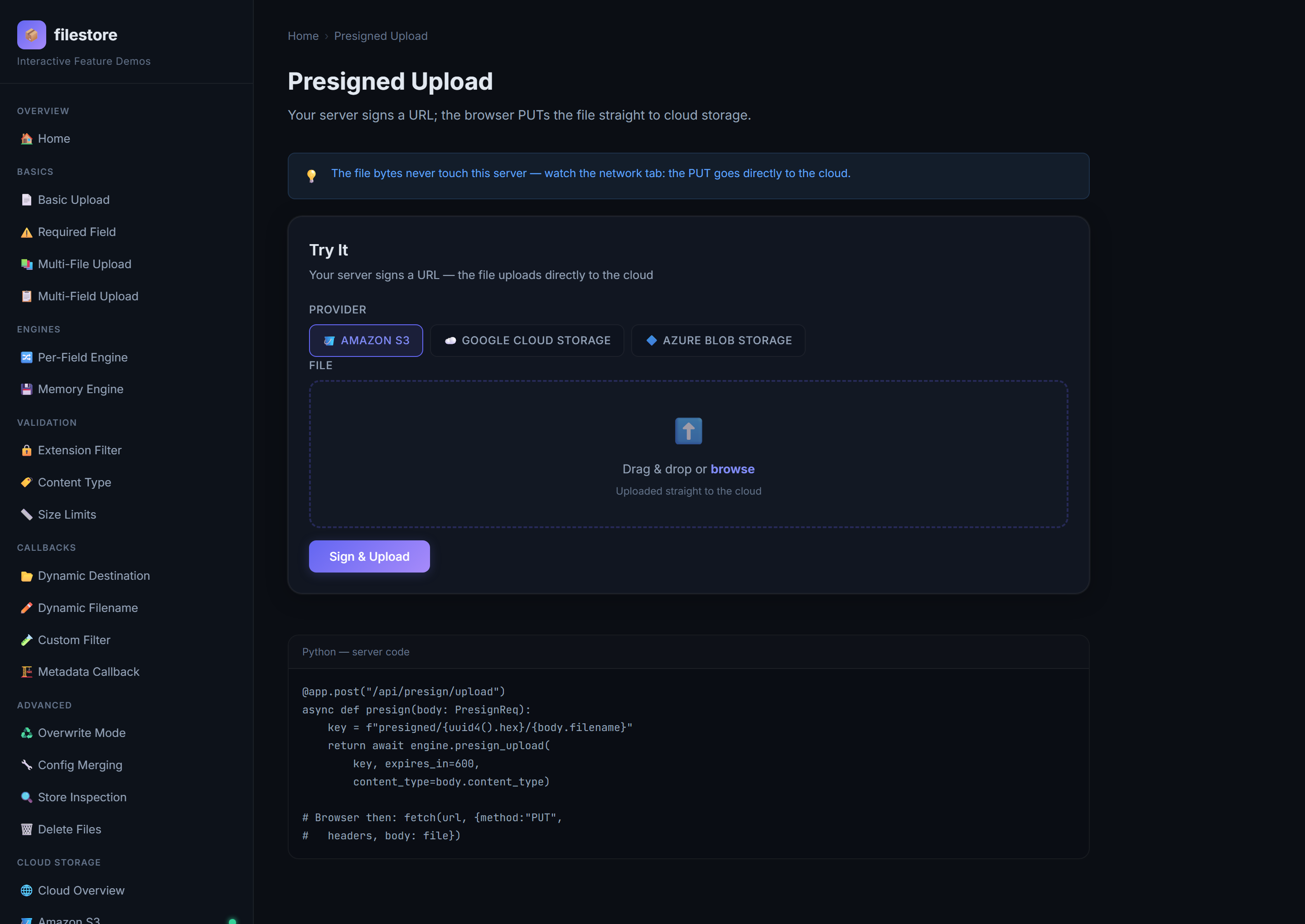
The API endpoint signs an upload:
from pathlib import PurePosixPath
from uuid import uuid4

from fastapi import Depends
from pydantic import BaseModel
from filestore import PresignedURL, S3Engine

s3 = S3Engine(bucket="private-uploads", region="eu-west-1")


class UploadIntent(BaseModel):
    filename: str
    content_type: str


@app.post("/uploads/presign")
async def presign_upload(
    body: UploadIntent,
    user=Depends(current_user),
) -> PresignedURL:
    suffix = PurePosixPath(body.filename).suffix.lower()
    key = f"users/{user.id}/{uuid4().hex}{suffix}"
    return await s3.presign_upload(
        key,
        expires_in=600,
        content_type=body.content_type,
    )
The browser follows the returned instructions exactly:
const intent = await fetch("/uploads/presign", {
  method: "POST",
  headers: {"Content-Type": "application/json"},
  body: JSON.stringify({
    filename: file.name,
    content_type: file.type,
  }),
}).then(response => response.json());

await fetch(intent.url, {
  method: intent.method,
  headers: intent.headers,
  body: file,
});

await fetch("/uploads/finalize", {
  method: "POST",
  headers: {"Content-Type": "application/json"},
  body: JSON.stringify({key: intent.key}),
});
PresignedURL contains url, method, required headers, optional fields, key, expires_in, and storage. filestore handles the per-provider details for you: S3 uses SigV4, GCS produces V4 signed URLs, and Azure issues SAS tokens (adding the x-ms-blob-type header the client needs).
For private downloads, authorize access to an application record and then sign its stored key:
from fastapi import HTTPException


@app.get("/documents/{document_id}/download")
async def download_document(document_id: str, user=Depends(current_user)):
    document = await repository.get(document_id)
    if document is None or document.owner_id != user.id:
        raise HTTPException(status_code=404)
    return await s3.presign_download(document.storage_key, expires_in=300)
The companion Presigned Download demo mints these time-limited read links the same way, so you can keep buckets private and hand out access on demand.
Presigning is permission delegation, not upload validation. The bytes bypass FileStore, so its filters and final stream-size checks do not run. A robust flow records an upload intent, generates an application-controlled key, uses a short expiration, restricts bucket CORS, and verifies the resulting object's existence, size, type, ownership, and—when necessary—content before marking the upload complete.
Never accept an arbitrary object key from a request and sign or delete it without checking that the authenticated principal may access that object.
Delete stored objects
Local and cloud engines expose the same asynchronous deletion method:
In a real application, load the database record, authorize the current user, delete the object, and then update the record. Decide what should happen if either the storage or database operation fails. Object storage and relational databases do not form one automatic transaction.
The same consideration applies to partial uploads. If three files succeed and the fourth fails, you can keep the successful objects and ask the client to retry, or implement all-or-nothing semantics by deleting every store.successful_files key.
The complete configuration surface
The following settings can be passed to StoreConfig or a plain dictionary:
| Setting | Purpose |
|---|---|
destination |
Static directory/key prefix or callback |
filename |
Static stored name or callback |
metadata |
Static result metadata or callback |
filters |
One filter or an ordered list of filters |
allowed_extensions |
Case-insensitive extension allowlist |
allowed_content_types |
Case-insensitive MIME allowlist |
max_file_size |
Maximum size of an individual file in bytes |
min_file_size |
Minimum size of an individual file in bytes |
max_files |
Maximum file parts accepted by multipart parsing; default 1000 |
max_fields |
Maximum non-file fields accepted by multipart parsing; default 1000 |
max_part_size |
Multipart part-size parser limit in bytes; default 1 MiB |
chunk_size |
Local-engine read/write chunk size; default 1 MiB |
overwrite |
Permit replacement of existing objects; default False |
sanitize_filename |
Normalize unsafe name characters and path segments; default True |
base_url |
Public URL prefix, primarily for local files |
extra_args |
Extra keyword arguments forwarded to the backend upload call |
Backend identity and credentials—buckets, containers, regions, endpoints, and clients—belong on engine constructors. Upload policy belongs in StoreConfig.
Set parser limits as well as per-file limits. Also enforce an overall request-body limit at the reverse proxy, API gateway, or ingress layer so oversized requests can be rejected before application parsing consumes resources.
Filename safety and collision behavior
With sanitize_filename=True, filenames are converted into safe relative paths. Backslashes are normalized, absolute prefixes and traversal segments are removed, and unsafe characters are replaced. A hostile name such as ../../private data/report?.pdf cannot escape the configured local directory.
Sanitization is a defense, not a naming strategy. For public or multi-tenant systems, generate names on the server and retain the original name only as metadata. This avoids collisions, information disclosure, confusing Unicode behavior, and predictable URLs.
overwrite=False is the safe default, but backends express it differently:
- Local storage adds numeric suffixes.
- GCS uses an object-generation precondition.
- Azure passes the overwrite policy to the SDK.
- S3 receives normal
put_objectsemantics, so application-generated unique keys are the dependable collision strategy there.
Error handling: errors never escape the request path
A theme runs through every demo: the request path does not raise. Validation failures, a backend that rejects an upload, an unexpected exception in an engine — all become failed FileData entries inside the Store, and the request still returns a structured body you can branch on.
Only genuine setup mistakes raise, and they raise loudly at construction time:
FileStore()                                      # ConfigurationError: no fields
FileStore(fields=[field, field])                 # ConfigurationError: duplicate names
FileStore("file", engine=MemoryEngine)           # ConfigurationError: pass an instance, not the class
StoreConfig(min_file_size=10, max_file_size=1)   # ValidationError: bounds
Direct calls to engine operations such as delete() and presign_*() also raise, since they are not part of the dependency's result-collecting path. The exception hierarchy is small and catchable as a family:
graph TD
    F["FileStoreError"] --> C["ConfigurationError"]
    F --> V["ValidationError"]
    F --> S["StorageError"]
    F --> M["MissingDependencyError"]
F --> N["NotSupportedError"]| Exception | Meaning |
|---|---|
ConfigurationError |
Invalid store or backend setup |
ValidationError |
File violates a validation rule |
StorageError |
Backend operation failed |
MissingDependencyError |
Required optional cloud SDK is not installed |
NotSupportedError |
Engine does not implement the requested capability |
NotSupportedError is what you get if you ask a LocalEngine or MemoryEngine for a presigned URL. A backend advertises its capabilities (you saw them in the Cloud Overview matrix), and asking for one it does not have fails clearly rather than silently producing an unusable result.
Document multipart fields in OpenAPI
FileStore does not need a Pydantic request model to process uploads, but FileModel can generate one that mirrors a store's configured fields for schema and documentation tooling:
Required fields become required UploadFile properties, and fields with max_count > 1 become lists. The helper is useful when customizing an application's generated OpenAPI schema or when other tooling needs a Pydantic representation of the multipart contract.
Build a custom storage engine
Storage systems are application-specific. You may need an on-premises object store with a proprietary SDK, encrypted archival storage, a content-addressable store, or a wrapper that adds metrics and tracing.
Subclass StorageEngine and implement save():
from filestore import FileData, StorageEngine, StoreConfig
from starlette.datastructures import UploadFile


class ArchiveEngine(StorageEngine):
    name = "archive"

    def __init__(self, client, collection: str):
        self.client = client
        self.collection = collection

    async def save(
        self,
        *,
        file: UploadFile,
        filename: str,
        destination: str | None,
        config: StoreConfig,
        field_name: str = "",
    ) -> FileData:
        size = await self.resolve_size(file)
        self.validate_size_limits(
            size=size,
            config=config,
            field_name=field_name,
            filename=filename,
        )
        await file.seek(0)

        key = "/".join(part for part in [destination, filename] if part)
        result = await self.client.upload(
            collection=self.collection,
            key=key,
            stream=file.file,
            metadata=config.extra_args,
        )

        return FileData(
            filename=filename,
            content_type=file.content_type,
            size=size,
            key=key,
            url=result.url,
            storage=self.name,
        )
Optionally override delete(), presign_upload(), and presign_download(). The base class raises NotSupportedError for capabilities you do not implement.
If the SDK is synchronous, move blocking operations off the event loop—for example with asyncio.to_thread—as the built-in engines do. Custom engine instances are reused and may be called concurrently, so cache clients deliberately and avoid mutable per-request state on the engine itself.
Practical application patterns
The primitives above combine into many useful systems:
User avatars
Require one image, restrict its size and format, generate a deterministic or UUID-based name, store it beneath a user prefix, and optionally set overwrite=True when a new avatar should replace the old one. For real image safety, decode and re-encode it rather than trusting the suffix.
Document management
Store private PDFs in S3, GCS, or Azure; save FileData.key, size, original name, and uploader metadata in the database; issue short-lived downloads after authorization; and call delete() when retention policy expires.
CSV and spreadsheet imports
Use MemoryEngine for small imports, run filters for encoding and schema checks, preview parsed rows, and enqueue validated data for background processing. For large imports, upload directly to cloud storage and process asynchronously from the finalized object.
Image and media pipelines
Receive small images in memory for immediate thumbnailing, or send large media directly to object storage. Record the original key, enqueue transcoding, and attach derived-asset keys to application metadata.
Multi-tenant SaaS uploads
Use an authenticated callback to create tenant-scoped prefixes, generate opaque names, attach tenant and request IDs, and authorize every download and deletion against a database record rather than trusting a client-supplied key.
Hybrid and multi-cloud migrations
Assign engines per field or per configured store. New assets can go to a target cloud while legacy flows remain local. A form can also fan different data classes to providers selected for cost, residency, or compliance.
Tests and service boundaries
Use MemoryEngine to assert on exact bytes without filesystem cleanup, LocalEngine with a temporary directory for persistence behavior, and prebuilt fake cloud clients to test provider calls without real credentials.
A production checklist
filestore provides storage primitives; your application owns the surrounding security and operational policy.
- Authenticate upload endpoints and authorize the intended destination.
- Bound request size at the proxy and parser levels, then bound each file.
- Keep filename sanitization enabled and prefer server-generated names.
- Treat extensions and client MIME types as untrusted hints.
- Inspect magic bytes or parse sensitive formats; scan untrusted content for malware.
- Keep cloud buckets and containers private; serve files through short-lived authorized links.
- Restrict cloud CORS to known origins, methods, and headers.
- Never log file bodies, credentials, or complete presigned URLs.
- Persist storage keys, not only public URLs.
- Decide how
partialresults affect your business transaction. - Delete successful objects when a later database step fails if the workflow requires atomic behavior.
- Run CPU-heavy parsing, antivirus scanning, image conversion, and media transcoding outside the request path when latency matters.
- Use persistent or shared storage for local files in containerized and multi-instance deployments.
- Monitor success, rejection, partial completion, backend latency, orphaned objects, and cleanup failures.
- Test upload, download, deletion, URL expiration, credential rotation, and rollback for every enabled backend.
Choosing between proxied and direct uploads
filestore supports two complementary architectures:
Through FileStore |
Through a presigned URL |
|---|---|
| Bytes pass through FastAPI | Bytes go from client to cloud |
| Built-in callbacks and final stream validation run | Application must validate before signing and after upload |
| Simplest API and result lifecycle | Best scalability for large or frequent files |
| Works with local, memory, and cloud engines | Requires S3, GCS, or Azure |
| Good for small and medium files | Good for large files and mobile/web clients |
Use the dependency path when central validation and simple orchestration matter most. Use presigned transfers when bandwidth, request duration, and horizontal scalability dominate. Many mature systems use both: avatars and small documents go through the API, while videos, archives, and bulk imports go directly to cloud storage.
Try it yourself
The example app is the documentation — every screenshot above is a page you can poke at, with the server code shown next to the live form. It demonstrates basic and multi-file uploads, required fields, validation, callbacks, local and memory engines, per-field engines, cloud uploads, presigned transfers, deletion, and multi-cloud fan-out.
git clone https://github.com/Ichinga-Samuel/faststore.git
cd faststore
uv sync --group dev
uvicorn example.main:app --reload
# open http://127.0.0.1:8000
Cloud demos read credentials from a project-root .env (see example/.env.example); any provider you leave unconfigured simply shows as "off" and its endpoints report it gracefully.
Where to go next
- Quick Start — your first endpoint in five minutes
- Storage Engines — every backend in detail
- Presigned URLs — the direct-to-cloud pattern end to end
- Reading Results — the
StoreandFileDatamodels - Migrating from 1.x — the breaking changes and their replacements
- Production Checklist — security, limits, observability, and deployment checks
Final thoughts
The hard part of file upload is not moving bytes from one place to another. It is making the operation predictable: validating the right things, naming and locating files safely, handling partial failure honestly, separating infrastructure from routes, preserving enough metadata for the rest of the lifecycle, and choosing an architecture that still works when traffic grows.
filestore turns those concerns into a compact set of composable concepts:
- declare fields with
FileStoreandFileField; - express policy with
StoreConfigand callbacks; - choose infrastructure with a
StorageEngine; - reason about outcomes with
StoreandFileData; - bypass the API for large transfers with presigned URLs;
- extend the same interface when your storage needs are unique.
You can begin with one local upload endpoint and move to validated, private, multi-cloud workflows without changing the mental model. filestore's bet is simple: the easy things should be one line, and the hard things — validation, atomic writes, five backends, presigned URLs, partial failure — should already be handled, behind the same small API. Keep the easy upload easy, while giving production systems somewhere clean to grow.
filestore is MIT-licensed. Explore the source code, read the documentation, install it from PyPI, or open an issue. The example app is the fastest way to see whether the bet pays off — run it and click around.